
I didn't do anything, it's my “neighbours” (and Microsoft doesn't believe me)
Collective punishment for whole IP blocks, no explanation, and a free back door via Mailjet. With every step at the bottom for those who want to do it themselves.
It started with a login code. On my Top 2000 site (opens in a new tab) you can play the Pop quiz, and when you do, you get an email with a code. Simple. Until someone with a Hotmail address joined in and my server got back an error message I would love to have framed: 550 5.7.1 ... (S3150).
Loosely translated from Microsoftese: “We don’t know you, we don’t want you, and we are not going to tell you why.”
Nerds: the complete walkthrough with every command is at the very bottom, collapsible. Feel free to scroll straight down. We are not jealous.
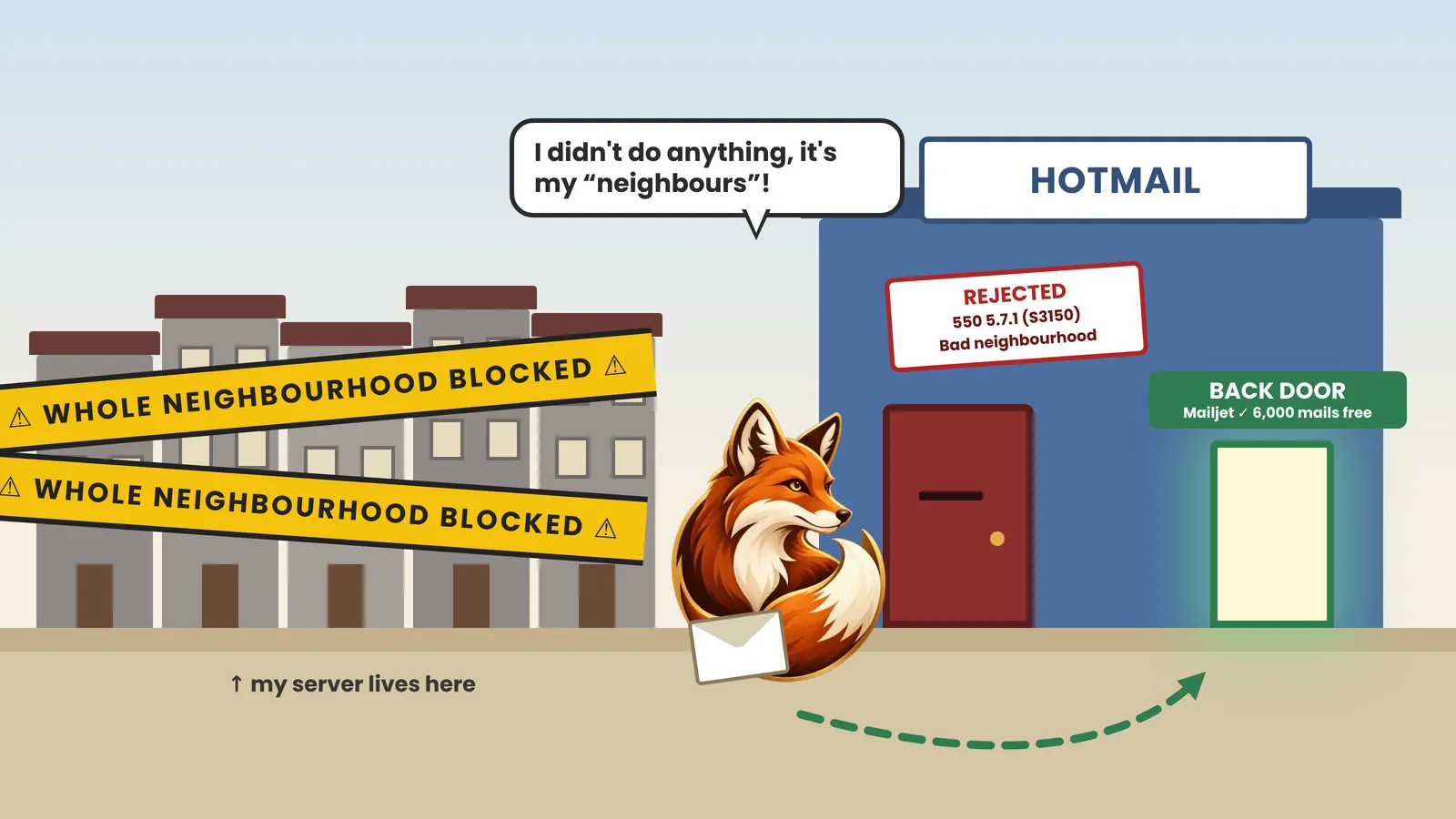
Microsoft punishes the whole street
My mail server runs on a Strato machine with Plesk. I checked everything you can check: SPF, DKIM, DMARC, reverse DNS. All of it was fine. My logs also showed no earlier mail to Hotmail at all. I had never bothered Microsoft, and I was rejected on my very first attempt.
That leaves only one logical explanation: it is not about me. It is about the address I live at. My server sits in a shared block at Strato, with dozens of other customers, and Microsoft blocks the whole street. I cannot prove it works exactly like that, because Microsoft does not say, but everything points that way.
Let us line up the facts. Microsoft:
- rejects mail without a clear reason. “S3150” is a code, not an explanation;
- punishes a whole subnet for the sins of a few “neighbours”. That is collective punishment, and nobody is allowed to hear what actually went wrong;
- lets you fill in a form and then answers “Mitigated”, with the small print that it is conditional, with a low daily limit, and that it may take 24 to 48 hours;
- lets you test again afterwards, and the address turned out to be still blocked.
It is a bit like a bouncer who won’t let you in because the neighbour played loud music last week. You did nothing. You were just born in the wrong postcode.
And it is not only about me. Every small web shop, every club, every hobbyist on a shared IP block at a host like Strato, or anyone else, can end up in this situation. The big party shuts the door, and it is up to the little ones to find a back door. A bit more transparency, for instance which address in the block causes the problem, would not be a luxury.
How it should work (according to someone who just lived it)
Blacklisting is fine in itself. Spam is a plague and I don’t wish anyone an inbox full of junk. But the way Microsoft does it is not right:
- Punishment per block instead of per sender. Whoever lists a whole IP block mostly hits the innocent. The spammers usually already have a new address.
- No explanation. A code like S3150 says nothing. Which address caused it? What happened, and when? Without that information, an administrator can’t improve anything.
- No reasonable way back. A form, a standard reply and 24 to 48 hours of waiting is not a process, it is a lottery. And an answer like “Mitigated, conditional, with a low daily limit” is not a solution but a conditional pardon.
- The costs fall on the small party. The big party shuts the door and the small one has to find a detour, at their own expense and in their own time.
What would work: show which address in the block is the cause, give a traceable reason, and don’t let a sender with a clean reputation pay for his “neighbours”.
MXToolbox: the doorman’s camera for your own server
If you want to know whether your own address lives in a bad neighbourhood, MXToolbox (opens in a new tab) is a fantastic tool, and free. Enter your mail server’s IP address in the blacklist check and within seconds you get an overview of about 68 lists. You can also look up your SPF, DKIM and DMARC records with it and check that your MX record is right.
This is what I got: everything green, except one list. That one list, UCEPROTECT level 3, doesn’t track which sender is bad, but simply lists a whole network block once enough bad IPs live in it. Collective punishment again. My address was on it only because my “neighbours” were on it too. Spamhaus was clean. It is the kind of result you can stare at for an entire afternoon.
If the front door is shut, use the back door
So the solution is not to convince Microsoft, because that is not going to work. The solution is to let someone Microsoft does trust deliver the mail: a transactional mail relay. I compared Brevo, Mailjet, Postmark, Amazon SES and Mailgun, and picked Mailjet (opens in a new tab).
The advantages of Mailjet for this purpose:
- Free: the free plan gives you 6,000 mails per month and 200 per day. My site sends a handful of mails to Hotmail addresses in a week at most. Plenty, and no credit card needed.
- Mailjet’s addresses have a good name at Microsoft, instead of the bad reputation of my “neighbours”. My mail rides along in a bus the doorman doesn’t look at.
- The mail stays mine: Mailjet signs the mail with a DKIM signature of my own domain (with a 2048-bit key, by the way, a lot stronger than the 1024-bit key Plesk makes by default). The message headers still show my domain, and SPF, DKIM and DMARC all three say “pass”.
- Only where needed: only mail to Microsoft addresses takes the detour. Everything else goes out through my own server, exactly as before.
- Nothing to change on your site: no new code, no different form, nothing changes for visitors. It is purely a server matter.
- One line to undo it: I wrote down the undo command before I started.
The test
First a bare test mail of one sentence, subject “Test”. It landed in Hotmail’s spam folder. The message headers showed SPF, DKIM and DMARC all passing. So Microsoft found the mail technically flawless but suspicious in content: one sentence, no history. I know that feeling from job interviews.
Then the real quiz code mail, requested through the site. That went straight to the inbox. The first real Hotmail mail in three days that did not bounce felt like a bus that finally runs on time.
Add your own domains: a safety net
Here is another nice benefit: you decide which domains go through the relay. The list of Microsoft domains is not limited to hotmail, outlook, live and msn. You can also add your own domains, for instance your work domain, if that runs on Microsoft 365. Business mail you send to yourself or to customers can then also use the back door, as a safety net in case Microsoft shuts the front door for your server too. One line in a text file and you are done.
How do you know whether a domain is on Microsoft 365? Look up its MX record, for instance at MXToolbox. If it says something like ...mail.protection.outlook.com, the mail lives at Microsoft and the domain can go on the list.
What I learned
- First find out whether the bounce is about your server or about your address. Microsoft looks at the neighbourhood, not at you.
- Use MXToolbox before you start guessing. It takes a minute and saves a day of searching.
- A relay does not have to be big or expensive. A free plan is enough for a small site.
- One step at a time, a backup first, and the undo command written down before you start.
- Be suspicious of a check that says nothing. No error message is not success (more on that in the technical steps below).
- Plesk may regenerate its configuration one day. Then my line disappears and mail goes out directly again. That is safe, but I have set a reminder to check in a month.
How I build my other sites to be secure and private is explained in the popup Behind the scenes, behind the little shield. And how the Top 2000 site works on the inside is in The tech behind top2000feitjes.nl (opens in a new tab).
For the nerds: every step to do it yourselfClick to expand
This is exactly what I did, in the order I did it. The example is a Postfix server (here with Plesk at Strato), but it works anywhere you control Postfix and DNS. Replace yourdomain.com and the example addresses with your own. Do each step separately and check the result before you continue.
What you need: root access to the server, access to your domain’s DNS, a free Mailjet account, and libsasl2-modules (on Debian/Ubuntu: apt install libsasl2-modules). Allow an hour.
Domain names, IDs and keys are masked in the examples (xxxxxxxx.com) or replaced by placeholders.
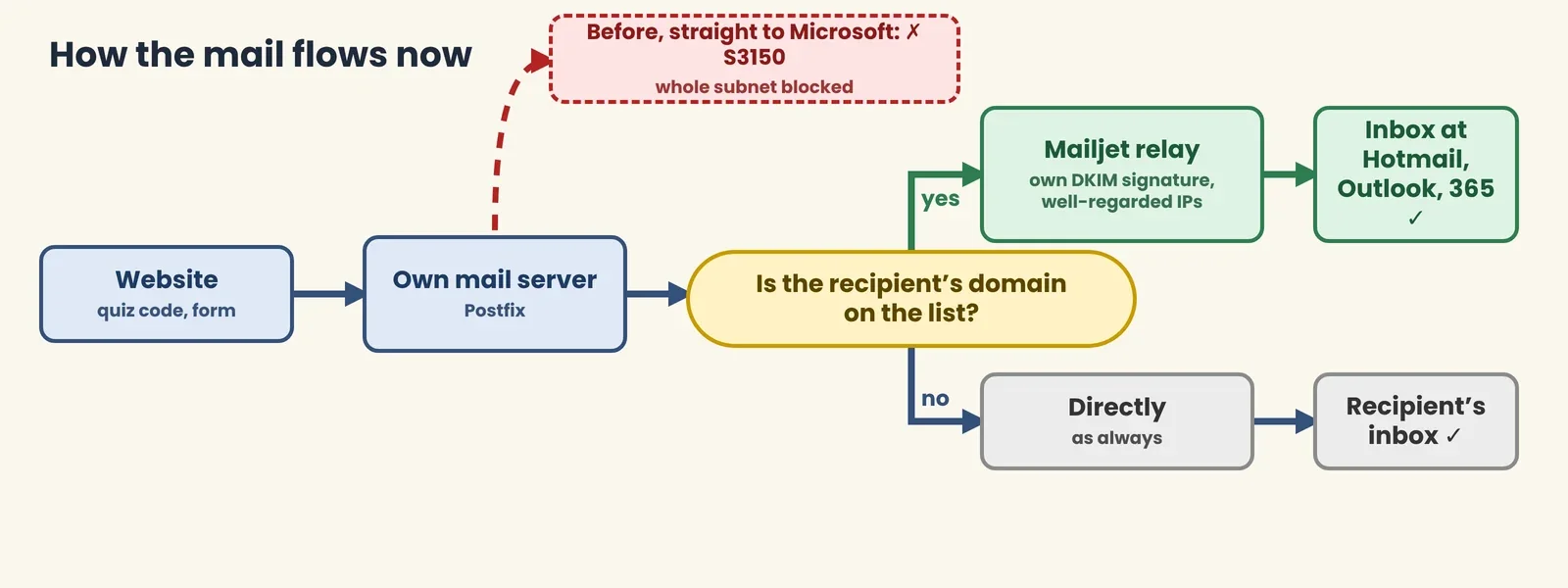
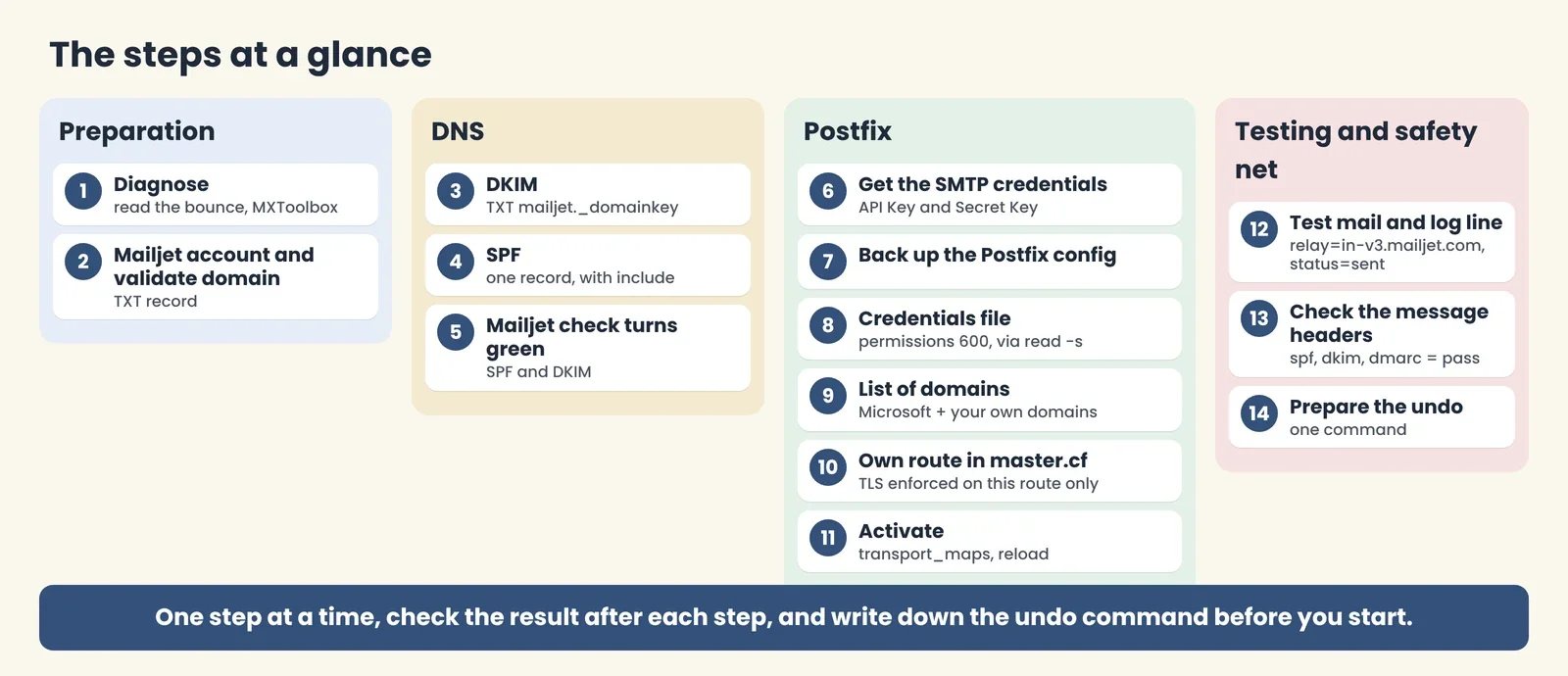
What lives where (everything in /etc/postfix/, except the DNS records):
| What | Where | Purpose | Permissions |
|---|---|---|---|
| Mailjet login | sasl_passwd_mailjet (+ .db) | API Key and Secret Key | 600 |
| List of domains | transport_mailjet (+ .db) | which domains go through Mailjet | 644 |
| Own route | master.cf (at the bottom) | service mailjet with SASL and TLS | n/a |
| Activation | main.cf | transport_maps with your own list in front | n/a |
The DNS records (at your DNS provider, on xxxxxxxx.com):
| Purpose | Type | Name (prefix) | Value |
|---|---|---|---|
| Domain validation | TXT | mailjet._xxxxxxxx | xxxxxxxxxxxxxxxxxxxxxxxxxxxxxxxx (code from Mailjet) |
| DKIM | TXT | mailjet._domainkey | k=rsa; p=MIIBIjANBgkq… (public key, 401 characters, on one line) |
| SPF | TXT | (empty, so the root domain) | v=spf1 include:spf.mailjet.com mx -all |
SPF before and after: before v=spf1 mx -all, after v=spf1 include:spf.mailjet.com mx -all.
Step 1: diagnose
- Read the bounce in
/var/log/mail.log:grep -E 'status=bounced' /var/log/mail.log | tail. With Microsoft you will see something like550 5.7.1 ... (S3150). - Check at MXToolbox (opens in a new tab): the blacklist check for your mail server’s IP address, and the lookups for SPF, DKIM, DMARC and MX. This rules out mistakes of your own.
Step 2: Mailjet account and domain validation
- Create a free Mailjet account and add your domain under Account, Domains and senders.
- Mailjet asks you to validate. Choose the DNS route: create a TXT record with the name Mailjet gives (of the form
mailjet._<id>) and the value they give. The file route (a small file on your website) did not work for me: Mailjet’s checker does not follow the redirect from http to https and then reports nothing.
Step 3: DKIM
Create a TXT record mailjet._domainkey with the key Mailjet shows as its value, on one line, of the form k=rsa; p=MIIB.... After a few minutes check at MXToolbox (DKIM lookup with selector mailjet) that the full value is there. A long key (400+ characters) is sometimes chopped into pieces by DNS management; that is normal as long as the whole thing is right.
Step 4: SPF
You may have only one SPF record. Add include:spf.mailjet.com to the existing one. Example:
v=spf1 include:spf.mailjet.com mx -allAt Strato, SPF is not a separate TXT record but a radio button (“STRATO SPF rule”). Set that to “No STRATO SPF rule” and create your own TXT record with an empty prefix and the value above. Two SPF records is the same as none.
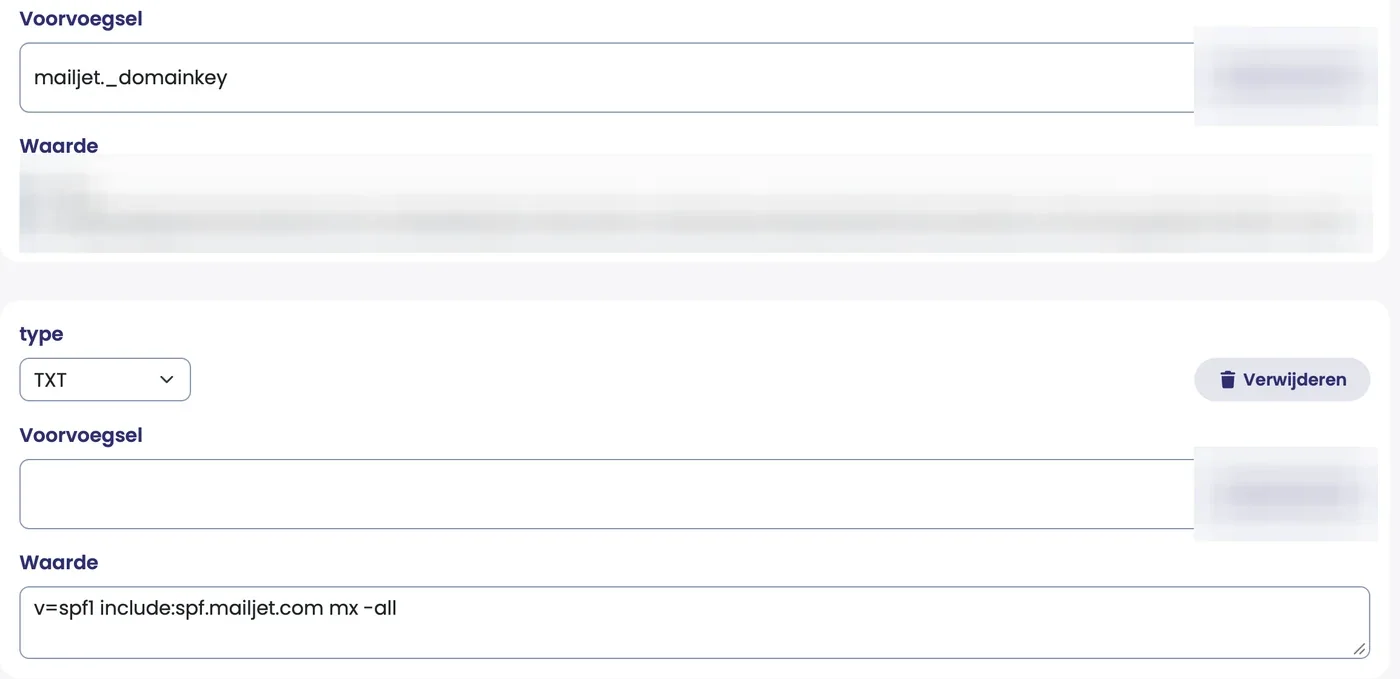
Step 5: have Mailjet check it
Refresh the “Domain Authentication Setup” page in Mailjet and let it check SPF and DKIM. Both should turn green (“looks good”). If it is still yellow after the DNS change has gone through, refresh and try again later. Mailjet shows the result of the last check.
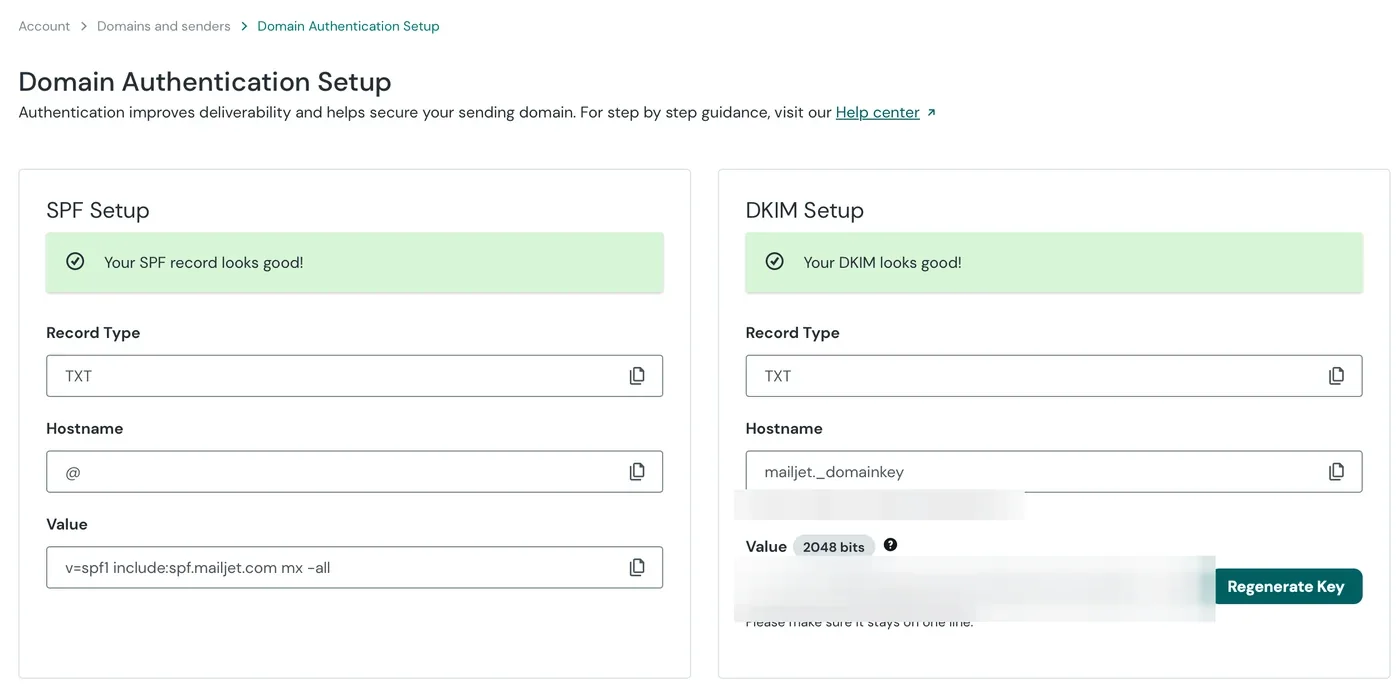
Step 6: the SMTP credentials
In Mailjet under API, API Key Management you find your API Key (username) and Secret Key (password). The server is in-v3.mailjet.com, port 587 (or 465). Never paste these in a chat or a document.
Step 7: backup
Before you change anything in Postfix:
mkdir -p /root/site-backups && cp -a /etc/postfix /root/site-backups/postfix-before-mailjet && postconf -n > /root/site-backups/postfix-postconf-n-before-mailjet.txtWith Plesk, also copy /var/spool/postfix/plesk.
Step 8: the credentials file
This command asks for the keys without showing them on screen or keeping them in your command history:
read -s -p 'API Key: ' K; echo; read -s -p 'Secret Key: ' S; echo; umask 077; printf '[in-v3.mailjet.com]:587 %s:%s\n' "$K" "$S" > /etc/postfix/sasl_passwd_mailjet; unset K S; postmap hash:/etc/postfix/sasl_passwd_mailjet; chmod 600 /etc/postfix/sasl_passwd_mailjet /etc/postfix/sasl_passwd_mailjet.dbCheck without showing the keys: awk '{print $1, length($2)}' /etc/postfix/sasl_passwd_mailjet. You see [in-v3.mailjet.com]:587 and a number (65 for me: two keys of 32 characters and a colon).
Step 9: the list of domains
This file decides which domains go through Mailjet. You can put in as many as you like:
cat > /etc/postfix/transport_mailjet <<'EOF'
hotmail.com mailjet:[in-v3.mailjet.com]:587
hotmail.nl mailjet:[in-v3.mailjet.com]:587
outlook.com mailjet:[in-v3.mailjet.com]:587
outlook.nl mailjet:[in-v3.mailjet.com]:587
live.com mailjet:[in-v3.mailjet.com]:587
live.nl mailjet:[in-v3.mailjet.com]:587
msn.com mailjet:[in-v3.mailjet.com]:587
windowslive.com mailjet:[in-v3.mailjet.com]:587
EOF
postmap hash:/etc/postfix/transport_mailjet
I use sixteen Microsoft domains (including .be, .de, .fr and .co.uk). Add your own domain, for instance your work domain if it runs on Microsoft 365: add a line workdomain.com mailjet:[in-v3.mailjet.com]:587 and run postmap again. Note that a line only applies to addresses on exactly that domain, not to subdomains.
Step 10: the Mailjet route in Postfix
Add your own service at the bottom of /etc/postfix/master.cf (the grep -q stops you from adding it twice):
grep -q '^mailjet ' /etc/postfix/master.cf || cat >> /etc/postfix/master.cf <<'EOF'
mailjet unix - - n - - smtp
  -o smtp_sasl_auth_enable=yes
  -o smtp_sasl_password_maps=hash:/etc/postfix/sasl_passwd_mailjet
  -o smtp_sasl_security_options=noanonymous
  -o smtp_sasl_mechanism_filter=plain,login
  -o smtp_tls_security_level=encrypt
EOF
postfix check && echo CHECK-OK
The smtp_tls_security_level=encrypt setting applies only to this route, so the rest of your mail doesn’t change. It does nothing yet: nothing points to it.
Step 11: activate
First look at your existing value: postconf transport_maps. Then put your own list before the existing one. With Plesk (which manages its own map) that became:
postconf -e 'transport_maps = hash:/etc/postfix/transport_mailjet, hash:/var/spool/postfix/plesk/transport' && postfix check && postfix reload && postconf transport_mapsOn a Postfix with no existing value, transport_maps = hash:/etc/postfix/transport_mailjet is enough.
Step 12: test
Send one test mail from an address on your validated domain to your own Hotmail address, and look in the log. Use your own addresses:
printf 'From: sender@yourdomain.com\nTo: you@hotmail.com\nSubject: Test relay\n\nTest mail via the relay.\n' | sendmail -f sender@yourdomain.com -t; sleep 10; grep 'to=<you@hotmail.com>' /var/log/mail.log | tail -2 | cut -c1-320Success looks like relay=in-v3.mailjet.com[...]:587 and status=sent (250 OK queued as ...). Mail that doesn’t pass Mailjet’s checks (for example from a sender domain that is not validated) is refused there. So keep an eye on your sender address.
Step 13: look at the message headers
In Hotmail, view the message headers (View, View message source) and look at Authentication-Results. You want to see: spf=pass, dkim=pass header.d=yourdomain.com and dmarc=pass. Is the test mail in spam? Look at X-MS-Exchange-Organization-SCL; a bare one-sentence mail often scores high. Then test with a real mail.
Step 14: undo
One command puts the original value back. Use the value you noted before step 11. With Plesk:
postconf -e 'transport_maps = , hash:/var/spool/postfix/plesk/transport' && postfix reloadTo remove only one domain: sed -i '/^workdomain.com /d' /etc/postfix/transport_mailjet && postmap hash:/etc/postfix/transport_mailjet && postfix reload.
Pitfalls at a glance
- Only one SPF record. Two is the same as none.
- Paste the DKIM value on one line.
- Mailjet needs your domain to be validated, otherwise it rejects the mail.
- Plesk may regenerate
main.cf(for instance onplesk repair mail). Then yourtransport_mapsline disappears and mail goes out directly again. Check withpostconf transport_mapsthat your list is still there. - The free plan gives 200 mails per day and 6,000 per month. Enough for me, but check it against your own volume.
- Keep your keys nowhere readable except the file with permissions 600.
Is your mail not arriving either, or would you like me to take a look at the mail server of your website or web shop? I’m happy to help.
#Microsoft #Hotmail #Mailjet #Postfix #Plesk #SPF #DKIM #DMARC #emaildeliverability #blacklist #selfhosting #TheJumpingFox
Regards,Pim